Overview
The Gradebook>School Setup>Maintenance>Gradebook Status screen allows you to enable/disable the Gradebook for your users: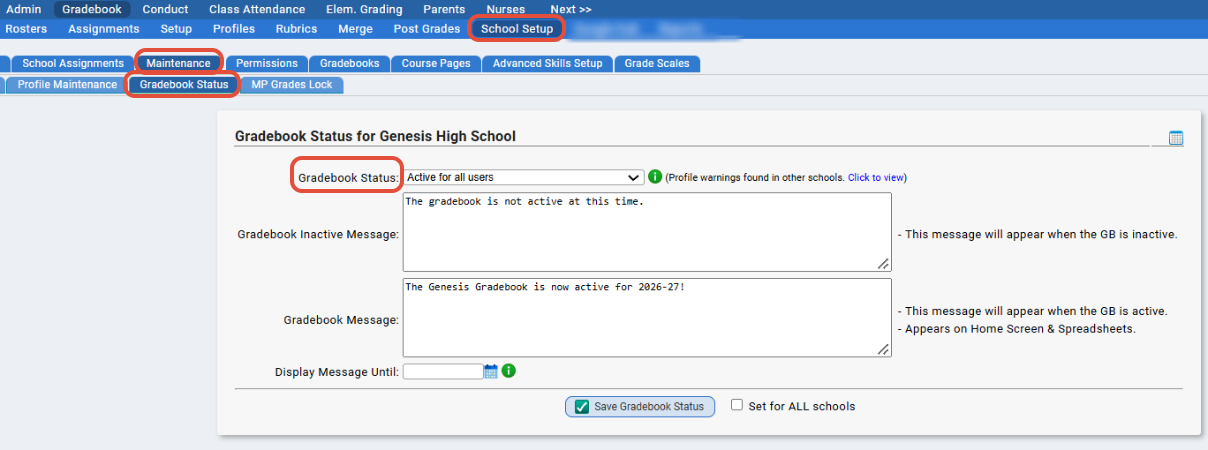
Options are:
- Active for All Users
- Inactive for All Users
- Only active for users with administrative rights: The 'Only active for users with administrative rights' will open the gradebook for only sysadmin users
Warnings
We added warnings to the Gradebook>School Setup>Maintenance>Gradebook Status screen. The warnings for the following scenarios: school profile exists in 'last year' but not 'this year' OR the school profile is not set to propagate in current year but was set to propagate last year.

Please review our documentation on pushing out profiles here for more info on this process.
Was this article helpful?
That’s Great!
Thank you for your feedback
Sorry! We couldn't be helpful
Thank you for your feedback
Feedback sent
We appreciate your effort and will try to fix the article