Overview
The following are Example Reports that were created using the Genesis Report Writer.
You may Download any of the reports listed, Install them onto your Genesis, and Change/Edit as necessary.
PLEASE NOTE: These reports were created by customers or Genesis support, and may not do exactly what your district needs, so please read the descriptions carefully. It is also important that you run tests to ensure it's producing the information and results needed. Some editing may be required for the report to work as you need it to, and you can make these changes using the Report Writer. If you are unfamiliar with writing reports in Genesis, it is strongly recommended you watch a Report Writer training video.
READ FIRST - How to install custom reports onto your Genesis System
Integrations/Interfaces reports available for download:
| Report Info | Sample Output |
| Connect ED Autodialer Export - Download Report Export uses contact info for Guardian 1 and Guardian 2. Created by: Genesis Last updated: May 2023 |  |
| Schedule Exports for Edario The following reports are to be used for exporting various scheduling data to Edario (master class and student scheduling software). Select the correct school year when running these reports. Print Periods Extract - Download Report Rooms Extract - Download Report Student Data Extract - Download Report (next year assignment) Teachers Extract - Download Report Courses Extract - Download Report Master Class Sections Extract - Download Report Student Requests Extract - Download Report Created by: Rich Dilts Last updated: 2026 Note: To import the scheduling data from Edario back into Genesis, the district must purchase the Master Class Schedule Import integration. Schedules are not 'synced' with Genesis. Instead, schools can perform one-time uploads once the Master Class Schedule Import task is enabled. | Print Periods: Rooms: Rooms: Student Data: Student Data: Teachers: Teachers: Courses: Courses: Master Class Sections: Master Class Sections: Student Requests: Student Requests: |
| Lifetouch Export - Download Report This produces an export file used to interface Genesis with the Lifetouch application. Created by: Genesis Last updated: May 2023 |  |
| Naviance Exports Export files that can be used to interface Genesis with Naviance. Edit to meet your districts needs. Naviance-Course catalog.rw Naviance-Teacher.rw Naviance-Students.rw Naviance-Parents.rw Created by: Genesis Last updated: May 2023 | |
| Kite Parent Upload Report - Download Report Produces an export of the parent email, student id, district identifier, and the opt in. Created by: Cedar Grove Last Updated: March 2026 | 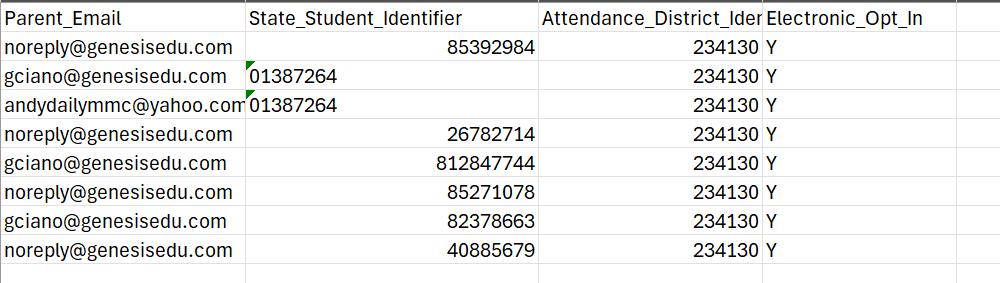 |
Was this article helpful?
That’s Great!
Thank you for your feedback
Sorry! We couldn't be helpful
Thank you for your feedback
Feedback sent
We appreciate your effort and will try to fix the article