TABLE OF CONTENTS
- Gradebook Grading Preferences & Student MP Averages
- The Gradebook Marking Period Average for Students
- Mechanisms for Computing Students' MP Averages
- Gradebook Profile "Grading Preferences" Setup for Averages
Gradebook Grading Preferences & Student MP Averages
The Gradebook Profiles' Preferences screen contains a "Grading Preferences" panel:
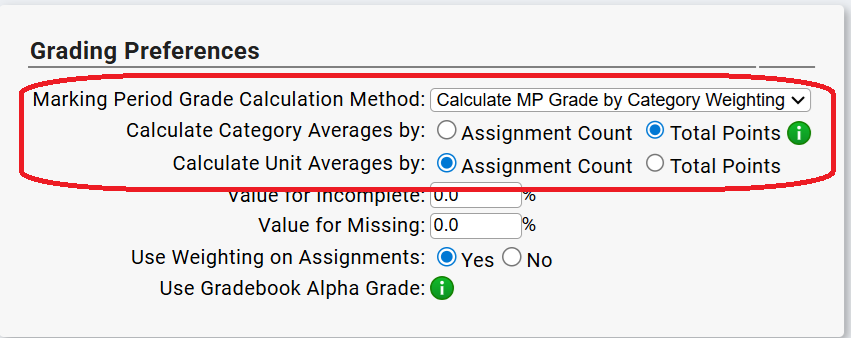
The top two parameters on the "Grading Preferences" panel control how Gradebooks using the Profile will calculate students' Marking Period averages - which are, in essence, their "MP Grades".
This article discusses how student Marking Period averages can be calculated - and how these two parameters control that process.
Units are NOT used in calculating MP averages/grades - but student's averages for Units can be separately calculated. The 3rd parameter controls how the Unit Averages are calculated.
The Gradebook Marking Period Average for Students
The student's Marking Period Average (MP average) is the "MP Grade" that is reported to the Grading module.
This section discusses the ways each student's MP Average - or "MP Grade" - can be calculated.
First we'll discuss the ways the students' MP Averages can be computed - then we will see how to set these up in the Gradebook Profiles.
Gradebook MP Averages vs Posted "Report Card Grades"
Gradebook Marking Period Averages are not the same as posted "Report Card Grades".
Marking Period Averages are always decimal values (e.g. 92.3).
Posted Report Card grades are either Alpha Grades (A+, A, A-, B+, B, ...) or integer numeric values (that is, whole numbers).
When Marking Period Averages are "posted" to the Grading module from the Gradebook, they go through a process of being converted from a Gradebook decimal value to whatever kind of value the school uses as their "Marking Period Grade." The conversion process - GB MP Average to Posted MP Grade - is heavily dependent on how your individual school has set up report card/marking period grading.
In addition to the conversion process - actually before it even begins - many schools allow teachers to adjust the grade they post, so they may choose to adjust the "Marking Period Average" before posting the grade to the Grading module. This is another way the "Marking Period Average" may not translate directly to the "Report Card Grade".
This article is concerned exclusively with how Gradebook Marking Period Averages are computed.
Mechanisms for Computing Students' MP Averages
There are essentially two ways to calculate MP averages:
- A simple 'total points' average of all of the student's Assignment grades (i.e. points grades) for the Marking Period.
- A combination of Category Averages: An average is created for each Category and the Category averages are combined via a formula. Categories are defined on the Profiles' "Categories" page.
Configuring How to Calculate Students' MP Averages
- The basic choice is:
- Use a simple 'Total Points' average of all Assignment Grades vs
- Use "Weighted Categories" - That is: first calculate an average for each Category, then combine the Category averages via a weighted formula. This will be explained below.
- The "Simple Average of Assignment Grades" choice is called "Total Points". If "Total Points" is chosen as the MP average mechanism, nothing else needs to be specified.
- The "Weighted Categories" choice is called "Category Weighting" and if it is chosen as the MP average mechanism, you must also specify two additional choices:
- How to calculate the average for each Category - that is, how to combine the Assignments in each Category to arrive at the final 'category average'.
- What the formula is for combining the 'category averages' to reach a student's "MP Average".
Some definitions are in order ...
What are "Total Points"?
Every Assignment in the Gradebook has a "Max Possible Score" field:
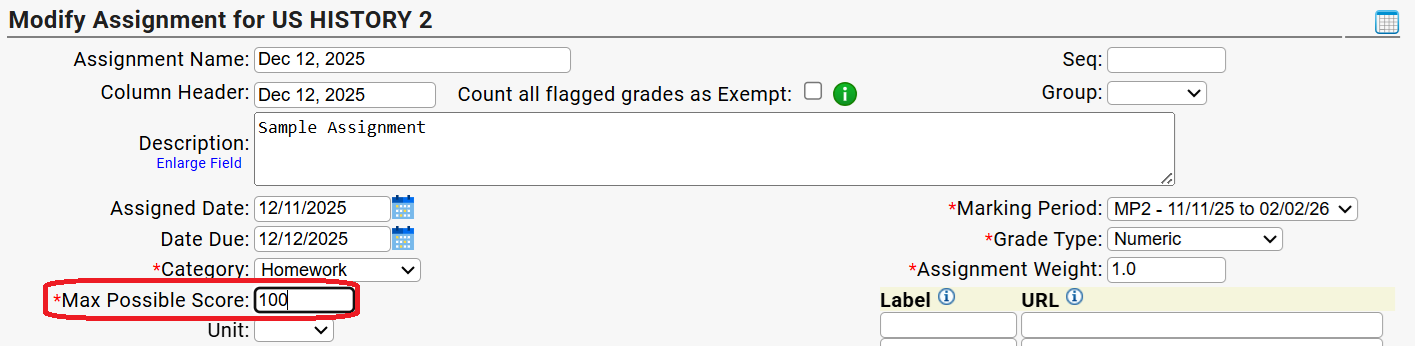
The "Max Possible Score" is the "Total Points" for the Assignment - also called the "Max Possible" points. A student's actual grade for an Assignment will be some or all (or very occasionally more than) the "Max Possible Score". For example: If an assignment is worth 100 points, a student will earn in the range 65 to 100 points (e.g. a 95). Rarely, a teacher might even give 'extra credit' - e.g. 102 points:
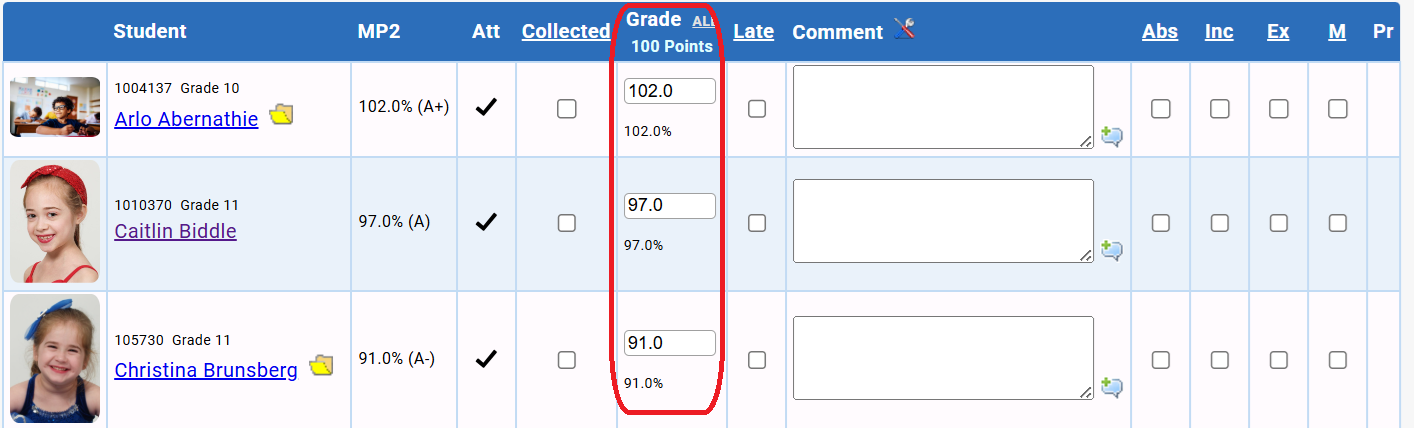
Note that a student's "Grade" for an Assignment is always: their points earned. Their "score" is the percentage earned, which is shown below the 'points earned' Grade. When an assignment is worth 100 points, the 'score' is essentially the same as the "points earned"/Grade. E.g. if "Max Possible Score" is 100, and a student earns 97 points, their "Points Earned" is 97 and their score is 97%. Both "points earned" and "score" are important in the discussion below.
The teacher gives the 'points earned' and the Gradebook calculates the 'percentage score'.
Points Attempted vs Points Earned
- Points Attempted: The sum of the "Max Possible Score" for all assignments in a Marking Period is the "points attempted". "Points Attempted" is the same for all the students in the Gradebook.
- Points Earned: The sum of a student's "Assignment Grade" for all assignments in the MP is the number of points they "earned" for the Marking Period. Points earned: the total number of points accrued by the individual student for the Marking Period.
Students' Scores vs Points Earned
As noted above, when an assignment is graded by the teacher, the teacher gives the student points. These are the student's points earned for the assignment. From those points, the gradebook also calculates the student's score for the assignment.
- Assignment Grade: A student's 'assignment grade' is the number of points the teacher gives them - their 'earned points' for the assignment.
- Assignment Score: The percentage of the 'Max Possible Score' the student 'earned'. The teacher gives the points, then the Gradebook calculates the score. [Score = (Points Earned/Points Attempted)*100]
The "Total Points" MP Average
This is the 'simple average' way to calculate each student's MP average.
The Marking Period's "Total Points" is: A sum of all of the "Max Possible Score' for all of the Marking Period's Assignments. This is also called the "points attempted" for the Marking Period.
The Student's Total Points Average is: A sum of the student's points earned for all the Marking Period's Assignments divided by the Marking Period's "Total Points".
That is: Sum the student's earned points and divide by a sum of the assignments' Max Possible points.
What is "Category Weighted" grading?
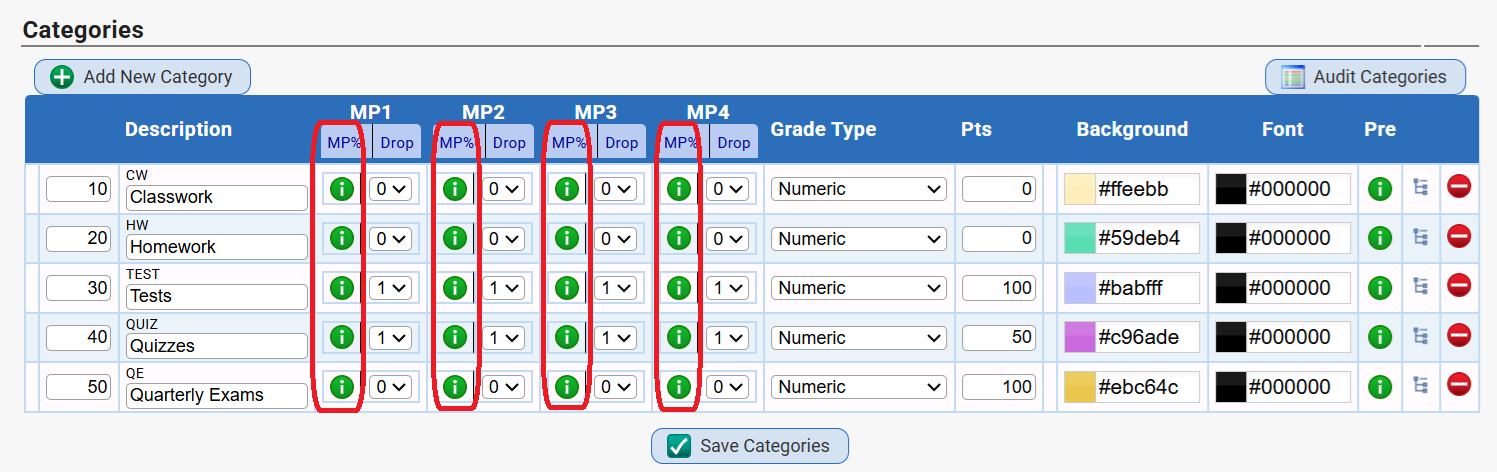
In Category Weighted grading an average is calculated for each Category and then those "Category Averages" are combined by a formula specified on the Profile's Category screen. For example:
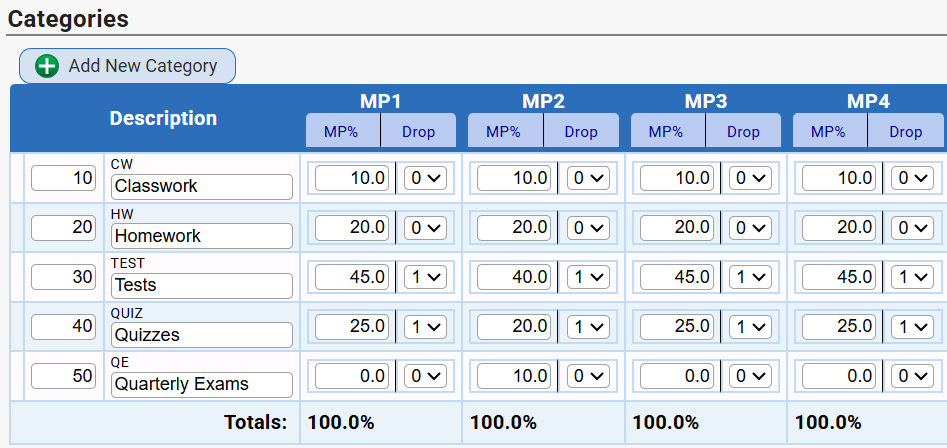
Please note that the formula is specified by Marking Period and need not be the same for each MP. The "formula" for each MP must combine the Category averages for a total of 100%.
The formula specifies how much each Category is worth for the MP. A Category can be worth 0% of an MP grade. That means the Category is NOT part of the final MP average for that MP. It's Assignments will "not count" for that MP.
When "Calculate MP Grade by Total Points" is chosen as the method for calculating students' MP Averages, the ability to create these MP calculation formulae is turned off:
But How are the Category Averages Calculated?
Before Categories are combined to produce the MP average (or MP Grade), an average must be calculated for each Category. There are two available methods for calculating each Category's MP average:
- "Total Points" - Just like "Total Points" for the MP average, Total Points for the Category Average is: a sum of the points the student earned for each of the Category's Assignments divided by the sum of the Max Possible points for each Assignment in the Category. That is: the sum of the Category "points earned" divided by "points attempted".
- "Assignment Count" - Assignment Count is different - it is calculated using scores, not points. A 'score' is calculated for each Assignment, then the scores are summed and that sum is divided by the number of Assignments. This is a "simple average of scores". Scores - not points. For example, if an Assignment is worth 50 "max possible" points, and a student earns 45 points, the student's score is 45/50 or 90%. If 30 Assignments were given over the course of the Marking Period, all of the student's scores are summed up and divided by 30: (Sum of student's scores)/(# of Assignments)
The difference is: A "points" average vs a "score" average.
More simply:
"Total Points": Calculate students' MP averages by points.
"Assignment Count": Calculate students' MP averages by scores.
Gradebook Profile "Grading Preferences" Setup for Averages
How are the choices described above implemented in the Gradebook - using that "Grading Preferences" panel?

The first question selects the basic method of computing the MP averages (or MP Grades) for each student. The second question is only relevant if the top choice is "Calculate MP Grade by Category Weighting".
Marking Period Grade Calculation Method
This is the basic choice between using a 'simple average' of Assignment grades to calculate students' MP averages and using 'weighted categories". The two options are:

- Calculated MP Grade by Total Points - This is the "simple average" choice. An average of points earned vs points attempted.
- Calculate MP Grade by Category Weighting - This is the more complicated "A formula of category averages".
Calculate Category Averages by
This option is only relevant if "Calculate MP Grade by Category Weighting" is selected for the MP Grade Calculation Method.

The two options are:
- "Assignment Count": This means 'an average of student's scores': calculate a score for each assignment, then sum the scores and divide by the number of assignments. This is 'a simple average of scores'.
- "Total Points": This means 'an average of points earned divided by points attempted': sum up the number of points a student has earned for all their assignments, divide that by the sum of the "Max Possible" points for each assignment. This is 'a simple average of points earned divided by points attempted'
What About Units?
Unit averages are never used to calculate MP Grades but Unit averages can be valuable. The third "averages" parameter allows you to specify how Unit Averages are calculated:

The options are the same as for Category Averages, only done for each Unit:
- "Assignment Count": This means 'an average of student's scores': calculate a score for each assignment, then sum the scores and divide by the number of assignments in the Unit. This is 'a simple average of scores for the Unit'.
- "Total Points": This means 'an average of points earned divided by points attempted': sum up the number of points a student has earned for all the Unit's assignments, divide that by the sum of the "Max Possible" points for each assignment in the Unit. This is 'a simple average of points earned divided by points attempted in the Unit'.
Units are created on the "Units" screen of each Gradebook Profile.
Was this article helpful?
That’s Great!
Thank you for your feedback
Sorry! We couldn't be helpful
Thank you for your feedback
Feedback sent
We appreciate your effort and will try to fix the article