TABLE OF CONTENTS
- SCED Codes
- Configuring Grading (NJ Course Roster)
- Course Instruction Type (CourseType in NJ Course Roster)
- FAQ
SCED Codes
NJSLEDS
All courses that are going to be submitted to NJ must be mapped to an NCES Course Code (and other fields).
The NJ SCED code list can be found on their site here.
Where can I update a course's SCED code in Genesis?
You can update a SCED code by selecting the appropriate value in the "NCES SCED Code" dropdown on Scheduling>Curriculum>Modify Course.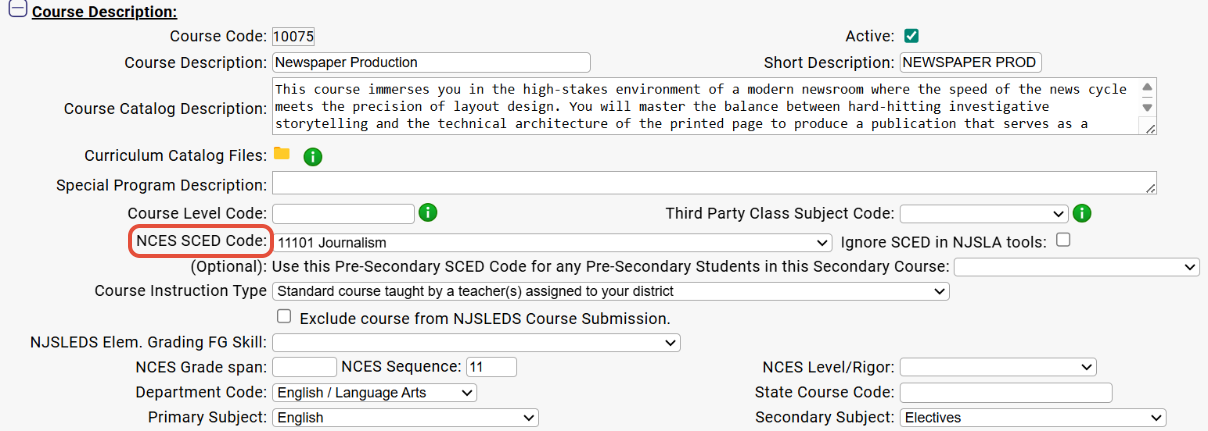
Elementary Regular Courses PK-5
If you are intend to be submit the regular (not specials) Elementary School Teacher rosters (PK through Grade 5) using any of the 7303x codes; then you do not need to map their courses if you have a master schedule already constructed.
There is an option in the NJSLEDS Course Submission tab that will ignore regular elementary school teacher’s schedule; and export the entire class as a 7303x codes.
NCES Pre Secondary Course Code 73032 Grade 02: Code 73032 represents Grade 2 courses that are not differentiated by subject area—that is, instances in which students are enrolled in a grade-specified course and are taught various subjects throughout the day, rather than being enrolled in subject-specific courses. Specific course content depends upon state standards for grade 2.
NCES SCED Fields
The NCES fields are located on the Scheduling>Curriculum>Modify Course screen for an individual course.
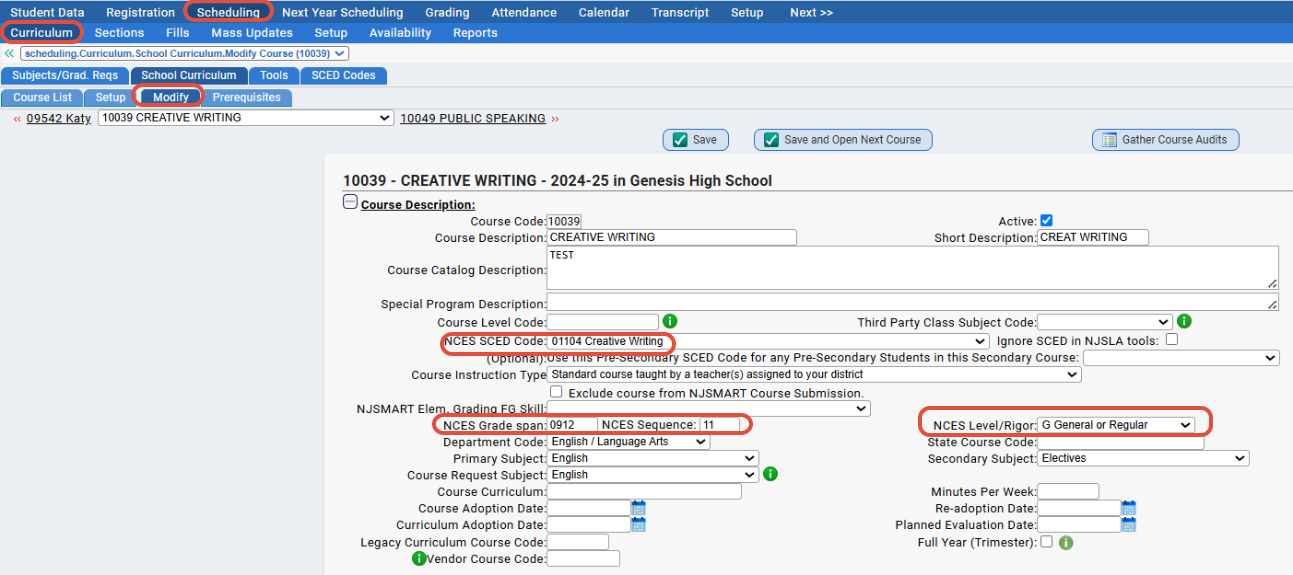
When modifying a course, the following fields are required:
NCES SCED Code
You must choose the nearest course available in the drop down that describes your local course. Refer to the downloadable online PDF manuals at the beginning of this document for an in-depth description of each NCES Course.
NCES Grade Span
If the course earns credit (High School Course), leave this field blank. If not, put in the Grade Span of the course. If the course were for 6th graders; 0606 would be entered into this field.
NCES Level/Rigor
The available options are:
- B = basic or remedial. A course focusing primarily on skills development, including literacy in language, mathematics, and the physical and social sciences. These courses are typically less rigorous than standard courses and may be intended to prepare a student for a general course.
- G = general or regular. A course providing instruction in a given subject area that focuses primarily on general concepts appropriate for the grade level. General courses typically meet the state’s or district’s expectations of scope and difficulty for mastery of the content
- E = enriched or advanced. A course that augments the content and/or rigor of a general course, but does not carry an honors designation.
- H = honors. An advanced level course designed for students who have earned honors status according to educational requirements.
- X=no specified level of rigor.
Genesis has already automatically set all courses in your school’s curriculum that had the Honors checkbox marked to an NCES Level/Rigor of H.
NCES Sequence
For most courses; this value should be 11. Genesis has already automatically set all courses in your schools’ curriculum to 11. For more information about this field, refer to the NJSLEDS online documentation on when it is appropriate to use other values here.
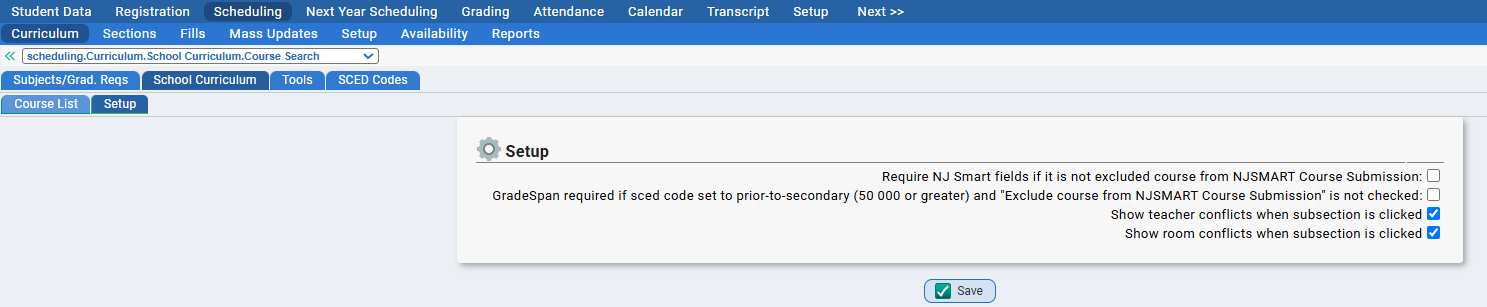
NOTE: NCES fields can be configured as required fields from the Scheduling>Curriculum>School Curriculum>Setup screen in Genesis
|
Configuring Grading (NJ Course Roster)
Students in grades 06 through 12 are required to report the final grades that they have earned for their courses In the Student Course Submission.
The NJSLEDS Standardized Grades
There are three kinds of NJSLEDS Standardized Grades: numeric grades, alpha grades and “completion status” grades.
The Student Course Submission standardized grades are split into 3 fields, one for each type of grade:
Numeric Grades
An unweighted numeric grade between 0 and 100.
Alpha Grades
The following alpha grades are allowed: A+, A, A-, B+, B, B-, C+, C, C-, D+, D, D-, E+, E, E-, F+, F and F-
Completion Status
These are grades such as “Withdrawal”, “Incomplete”, “Exempt”, etc. In Genesis proper, these are also Alpha Grades. In the NJSLEDS Course submission, these reside in the separate “Completion Status” field.
These ‘completion status’ grades include:
- P = Pass
- F = Fail
- W= Withdrawal
- I= Incomplete
- NG= No grade earned (i.e. and audited class)
Mapping Genesis Alpha Grades to the NJSLEDS Standard
Mapping Genesis Alpha Grades to the NJSLEDS Standardized grades can be done on the Grading>Setup>Valid Grades>Alpha Grades>View Grades screen.
This process must be done separately for every school that is reporting in the Student Course Submission: Grades are school-specific.
On the View Grades tab you will notice there is now a column called NJ. This column displays the NJ Standard Grade that your school’s Alpha grade is mapped to.
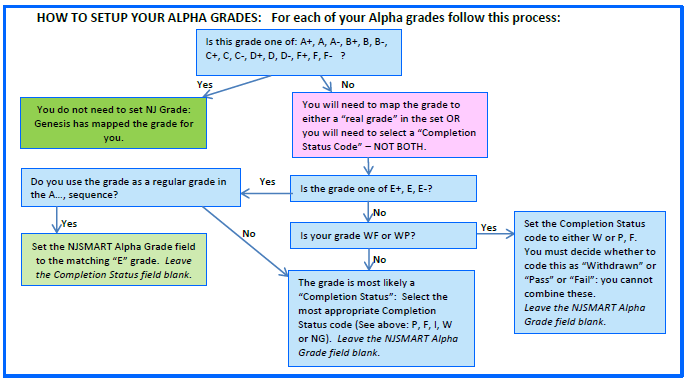
Genesis has automatically set the following grades for you: A+, A, A-, B+, B, B-, C+, C, C-, D+, D, D-, F+, F and F-.
Genesis cannot automatically set E grades because E in some schools means something like “Exempt”, and in others it is a grade between D and F. If you use “E” as grade you must manually set the NJ State equivalent.
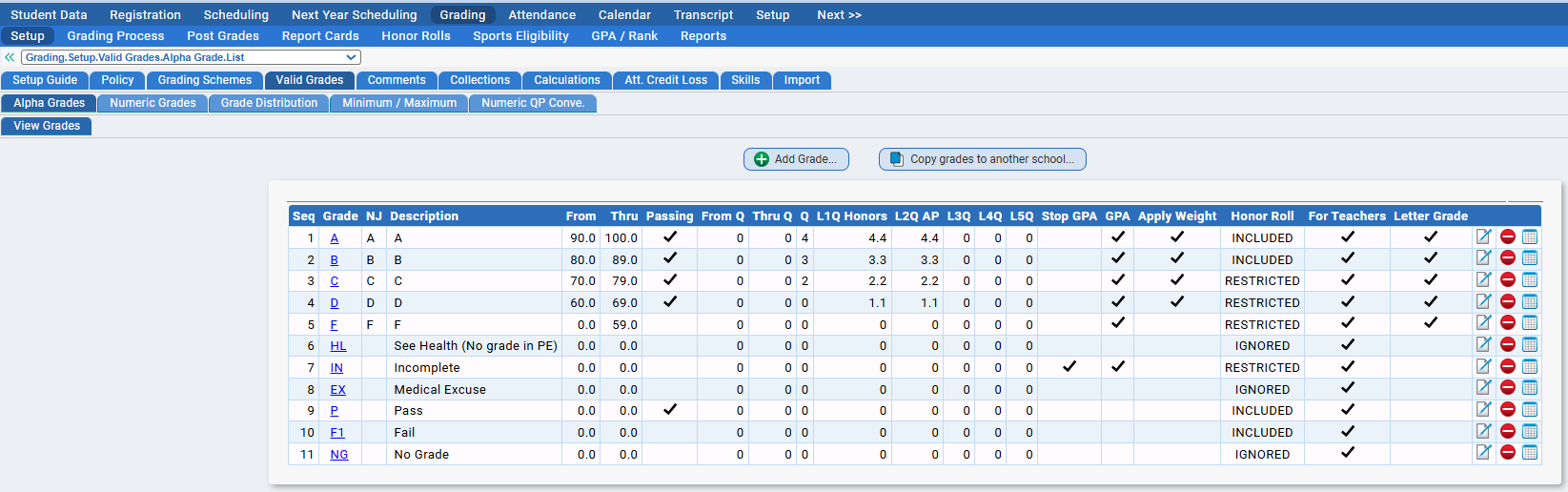
Select a grade to map (such as WP) by clicking on the link, or the corresponding modify icon. You will be brought to this screen: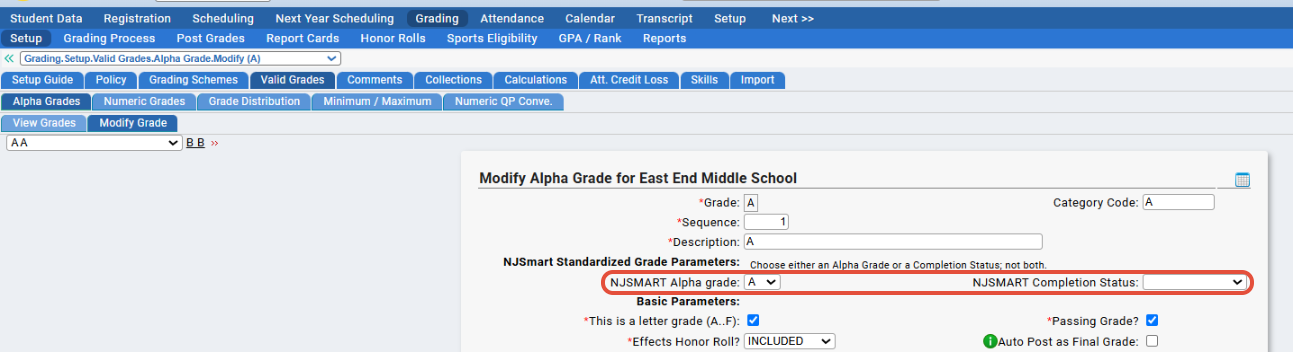
You must choose either a grade from the NJSLEDS Alpha Grade drop down; or from the NJSLEDS Completion Status dropdown. You cannot choose a value from both.
Course Instruction Type (CourseType in NJ Course Roster)
CourseType is a field in the Course Submission. It is an indication of the type of instructional environment in which a course section is occurring.
Acceptable Values in NJSLEDS:
• S1 = Standard course taught by a single teacher assigned to your district
• S2 = Standard course taught by co-teachers assigned to your district
• R = Remote course physically attended by the student off-site and taught by staff assigned or not assigned
to your district
• C = College level dual enrollment/ dual credit course taught by staff assigned or not assigned to your district
• O = Online course taught by staff assigned or not assigned to your district
How does Genesis determine the "Course Instruction Type" for the Course Submission?
Courses by default, are marked as "Standard Course taught by Teacher(s) within the District" - this means that Genesis will mark the course as "S1" or "S2" appropriately, when the data is pulled to Course Roster file.
Class-sections with a single teacher being reported to NJSLEDS will be set as "S1" while classes with multiple reported teachers will be automatically be marked as "S2" for instruction type.
Course-sections marked as "Standard Course" that do not have a teacher, will NOT be included in the Course Submission
On the other hand, if any student is scheduled into a Course marked as either:
- Remote course physically attended by the student off-site and taught by staff not assigned to your district
- College course taught by staff not assigned to your district
- Online course taught by staff not assigned to your district
in your school curriculum, Genesis will report Course Instruction Type as 'R', 'C', or 'O' respectively on the Course Roster Student file.
If you have 'R', 'C', or 'O' courses in Genesis, a Teacher is not required on the sections of that course.
The course will still be included in the Course Submission, but only on the Student Data portion of the report.
This assumes the course itself, is not marked "Exclude from NJSLEDS".
If any of these classes ARE assigned to an in-district teacher, it will be reported in the Staff file the same as any other course.
Courses not taught by in district teachers will not appear in the staff course file.
Dropdown:
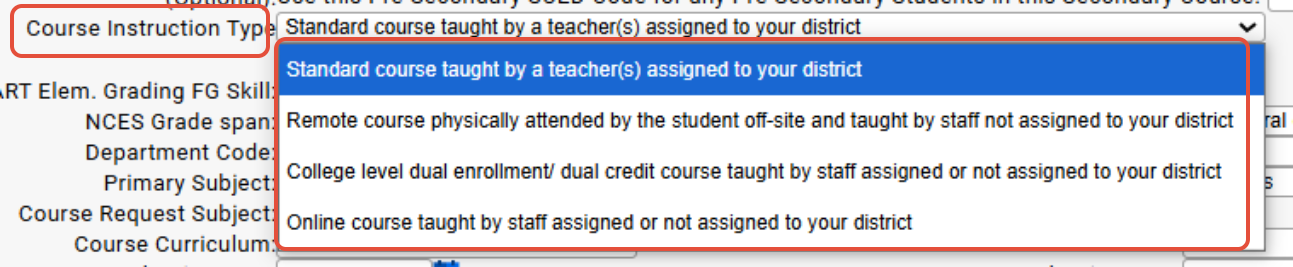 Options:
- Standard course taught by a teacher(s) assigned to your district
- Remote course physically attended by the student off-site and taught by staff not assigned to your district
- College level dual enrollment / dual credit course taught by staff assigned or not assigned to your district
- Online course taught by staff assigned or not assigned to your district.
DualInstitution Field
This field is the Office of Postsecondary Education Identification (OPE ID) of the college or university in which the student is
enrolled in a dual enrollment/dual credit course.
This field is mandatory for student course records with a CourseType = C (College level dual enrollment/dual credit course taught by staff assigned or not assigned to your district).
For OPE ID Codes, please refer to the NJSLEDS OPE ID List.
NOTE: If you believe an OPE ID is missing, we have a task called "CDS / OPE ID Import Task" that can update the OPE IDs. If you check off "Import OPE IDs" and/or "Import Out of State OPE IDs" on the task, the next time it runs, it will pull in any missing OPE IDs from NJSLEDS.
Class-sections with a single teacher being reported to NJSLEDS will be set as "S1" while classes with multiple reported teachers will be automatically be marked as "S2" for instruction type.
Course-sections marked as "Standard Course" that do not have a teacher, will NOT be included in the Course Submission
On the other hand, if any student is scheduled into a Course marked as either:
If you have 'R', 'C', or 'O' courses in Genesis, a Teacher is not required on the sections of that course.
If any of these classes ARE assigned to an in-district teacher, it will be reported in the Staff file the same as any other course.
Courses not taught by in district teachers will not appear in the staff course file.
Options:FAQ
Q: Can SCED codes be transferred from last year's data to this year's?
A: There is a tool on Scheduling>Curriculum>Tools called "Copy NCES Fields to Next Year" that you can run from the prior year. Make sure to check off "Only update next year course if SCED Code is blank (will not overwrite)" - it will just fill in any missing SCED codes and not overwrite any current data (should there be any.) There will also be a log so you can see exactly what it updated. Please reach out to the help desk if you have questions on running this.
Q: How often are the list of SCED codes updated?
A: Genesis updates the list of SCED codes every year and anytime that there are changes.
Was this article helpful?
That’s Great!
Thank you for your feedback
Sorry! We couldn't be helpful
Thank you for your feedback
Feedback sent
We appreciate your effort and will try to fix the article