Registration Search
A dedicated screen for searching through Registration Transactions (Entry, Withdrawal, Transfer, etc). This screen is useful for when you want to search for students that entered/withdrew/transferred as of a certain date/date range.
For example, if you wanted to search for all students that transferred to a charter school between 9/5/2026-1/27/2026, you can use the parameters illustrated below:
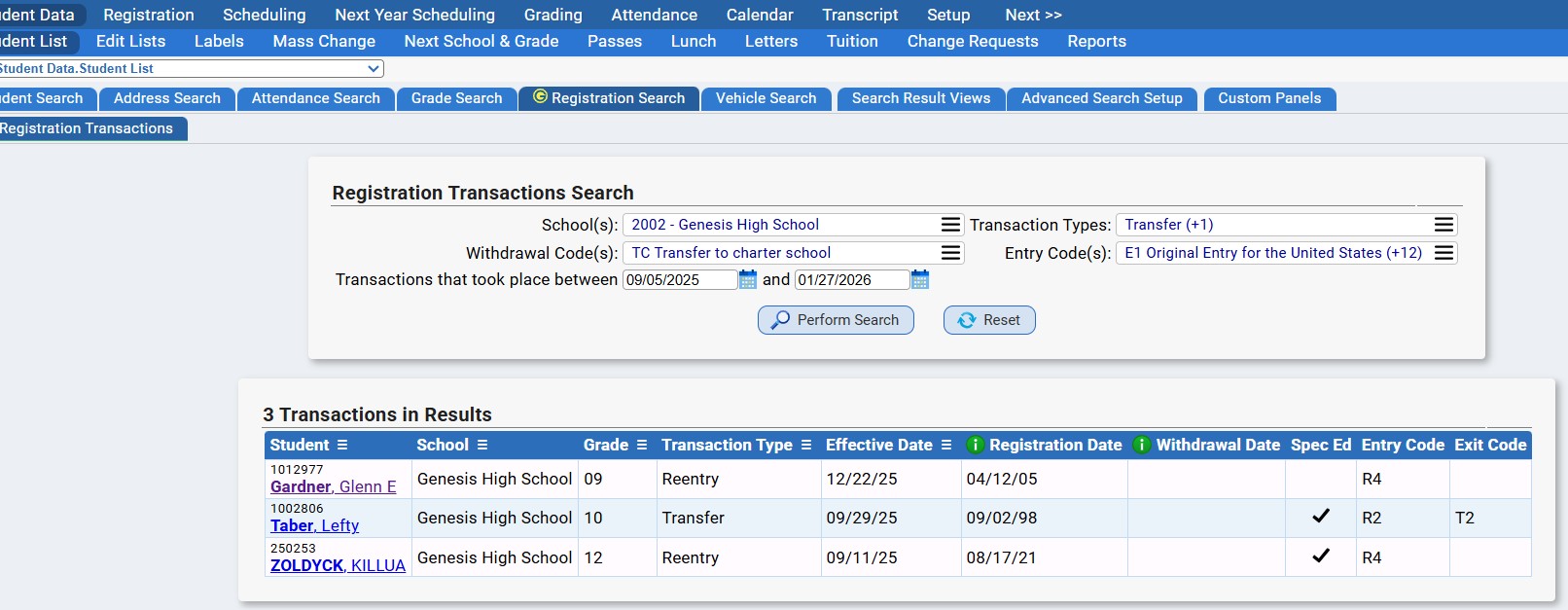
Note that the Effective Date is the start date of the tracking record located under the student's Student Data>Modify Student>Tracking>Registration tab. The Registration Date is the registration date located under the student's Student Data>Modify Student>Demographics>Required screen.
This screen also allows you to create a student list of your search results. You can also export your search results to Excel by clicking on the Excel icon at the top right of your screen.
Access
Use of the Registration Search requires access to this securable location:
studentdata.studentlist.registration.search
Was this article helpful?
That’s Great!
Thank you for your feedback
Sorry! We couldn't be helpful
Thank you for your feedback
Feedback sent
We appreciate your effort and will try to fix the article