TABLE OF CONTENTS
- Built-In Reports vs ReportWriter Reports
- Why Can't Built-In Reports be "Copied" as ReportWriter Reports?
- The Custom Report Library Might Help
Built-In Reports vs ReportWriter Reports
Built-In reports are supplied by Genesis and are typically not written as "ReportWriter Reports". "ReportWriter Reports", including all reports written locally in or for your district, are written in a specific "ReportWriter format" that is designed to give you the capability to write your own detailed reports while protecting access to the database and your sensitive data.
Most built-in reports are written in underlying, compiled Java code - in the Java language. There is no easy translation between Java code and the ReportWriter's report format. A very few built-in reports are written as ReportWriter reports - this is detailed below.
Several hundred useful ReportWriter reports are available in our Custom Report Library here. Some of these are close replicates of built-in reports. All reports in the Custom Report Library are available to you to download, install in your Genesis system, and customize.
Why Can't Built-In Reports be Copied as ReportWriter Reports?
Why isn't it Possible to "Just Tweak the Built-in Reports"?
We are happy to help if we can
If you would like a change to a built-in report, we encourage you to submit - or have your administration submit - a Freshdesk ticket requesting the update. We actively monitor all such requests and are open to enhancing our tools to help you whenever possible. We cannot guarantee that the update can be made, or made as quickly as you might hope, but we take all requests seriously.
We are also happy to help you try to rewrite a built-in as a ReportWriter report. It is starting from scratch in a way, but at least some of the reports can be approximated as ReportWriter reports. Again, not all of them can be. If you are trying to re-write a built-in as a ReportWriter report and run into trouble, submit a Freshdesk ticket asking for help.
Are Any Built-In Reports Written in "ReportWriter"?
A very small number of newer "built-in" reports have been written as ReportWriter reports. These can be copied and altered.
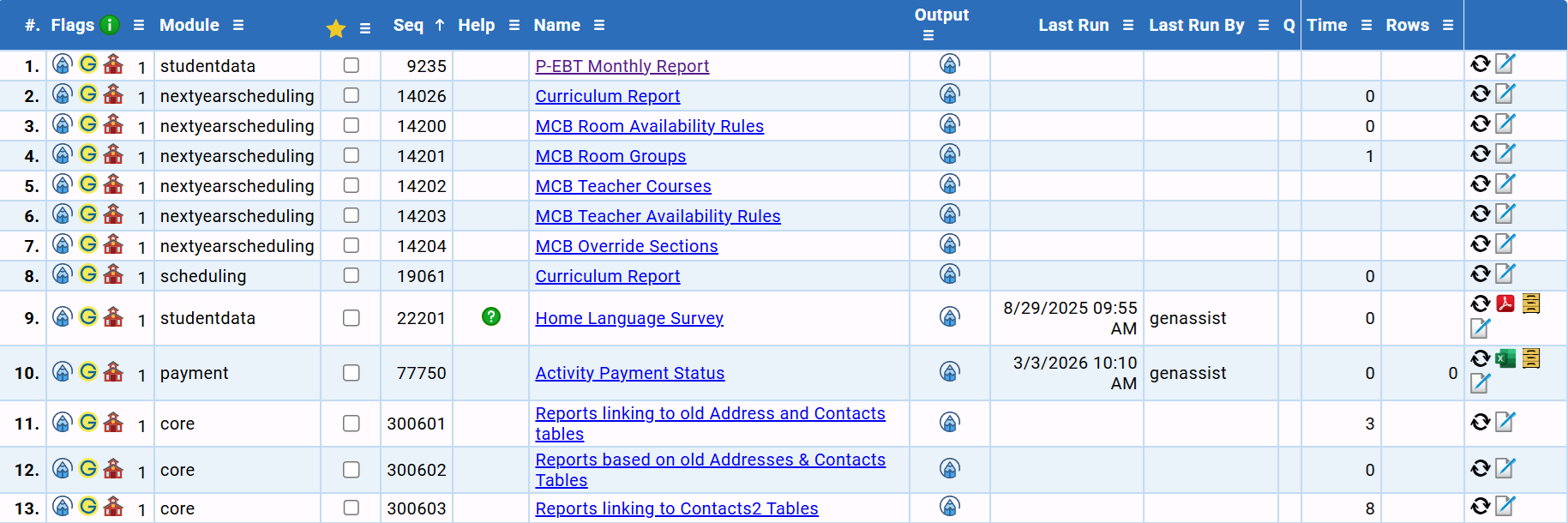
The set of Genesis-supplied built-in but yet ReportWriter reports includes the following:
How do I know which built-ins are ReportWriter reports?
On the left side of the list of reports, there are a set of "Flags" - icons that tell you things about the report:

The Genesis "G" icon means it is a built-in report. The "pen" icon at the left side of the list of flags indicates the report is a ReportWriter report:

To search for ReportWriter reports, you can use the "Type" field on the Report search dialog:
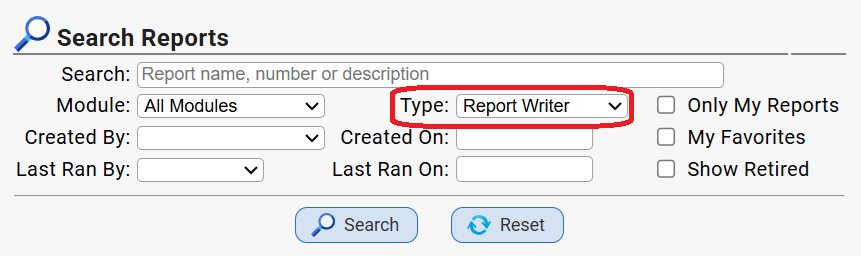
If you search in "All Modules", the built-in ReportWriter reports will appear at the top of the list (as they have Report #s that are less than the six digit "ReportWriter report #s that all start with 99).
Can these built-in ReportWriter reports be copied and altered?
Yes - there is a special way to make copies of these "built-in ReportWriter reports":
- Locate the report and click on the "Edit" icon at far right (pencil writing on a piece of paper):

- This brings up the "Edit" page for the built-in, which has a special copy control:
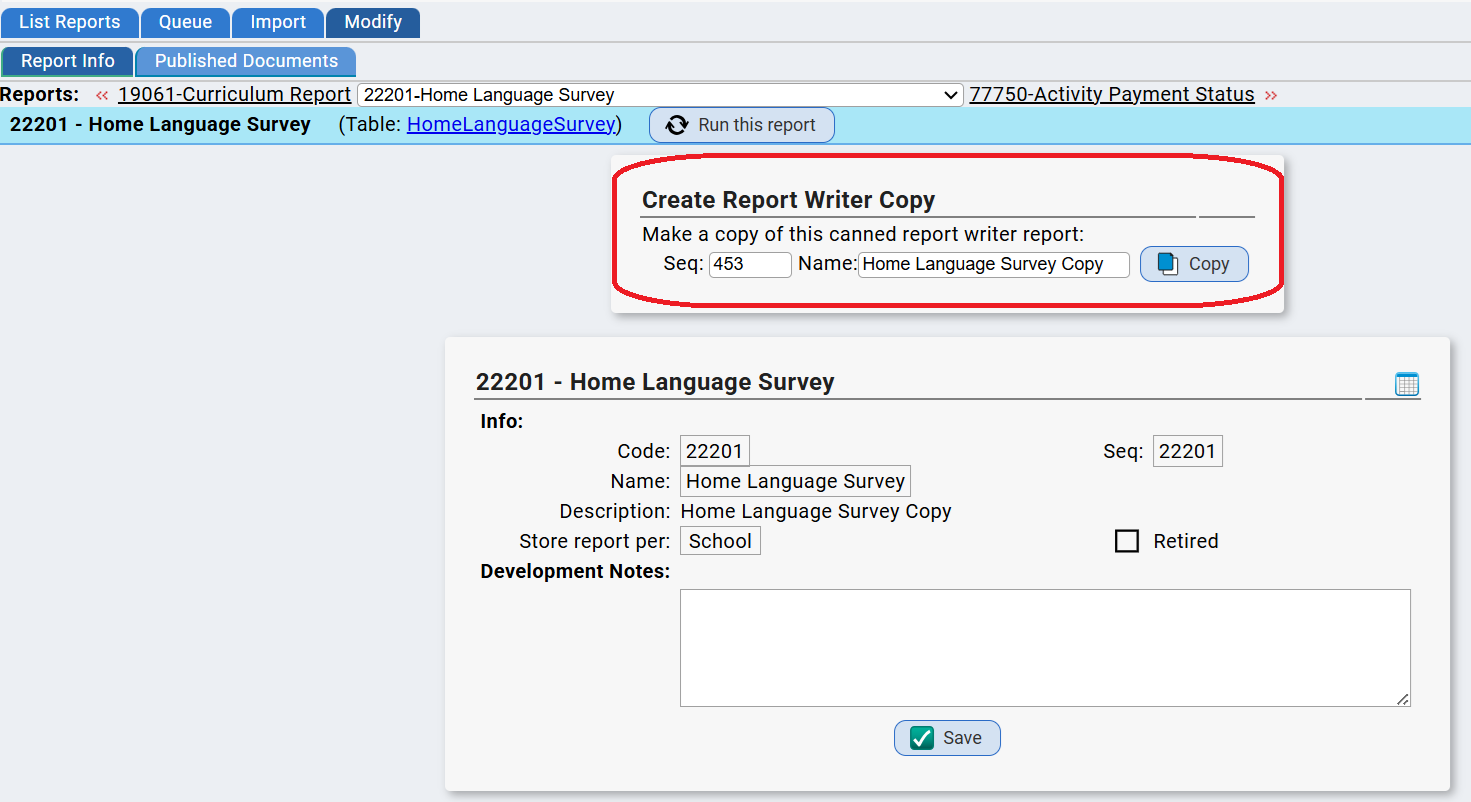
- To make an editable copy, note the "Seq" number field, update the "Name" field if you wish, and click "Copy". The Report # of the copy will be a 6-digit number beginning with "99" and ending with the "seq" number. IN the above example, the report number of the copy will be '990453'. Write down the number so you can find your report again!
- Once you click "Copy", the copy will be made and opened for you - and you will be on the "Report Info" screen of your new copy and all of the rest of the ReportWriter tabs will be available to you:
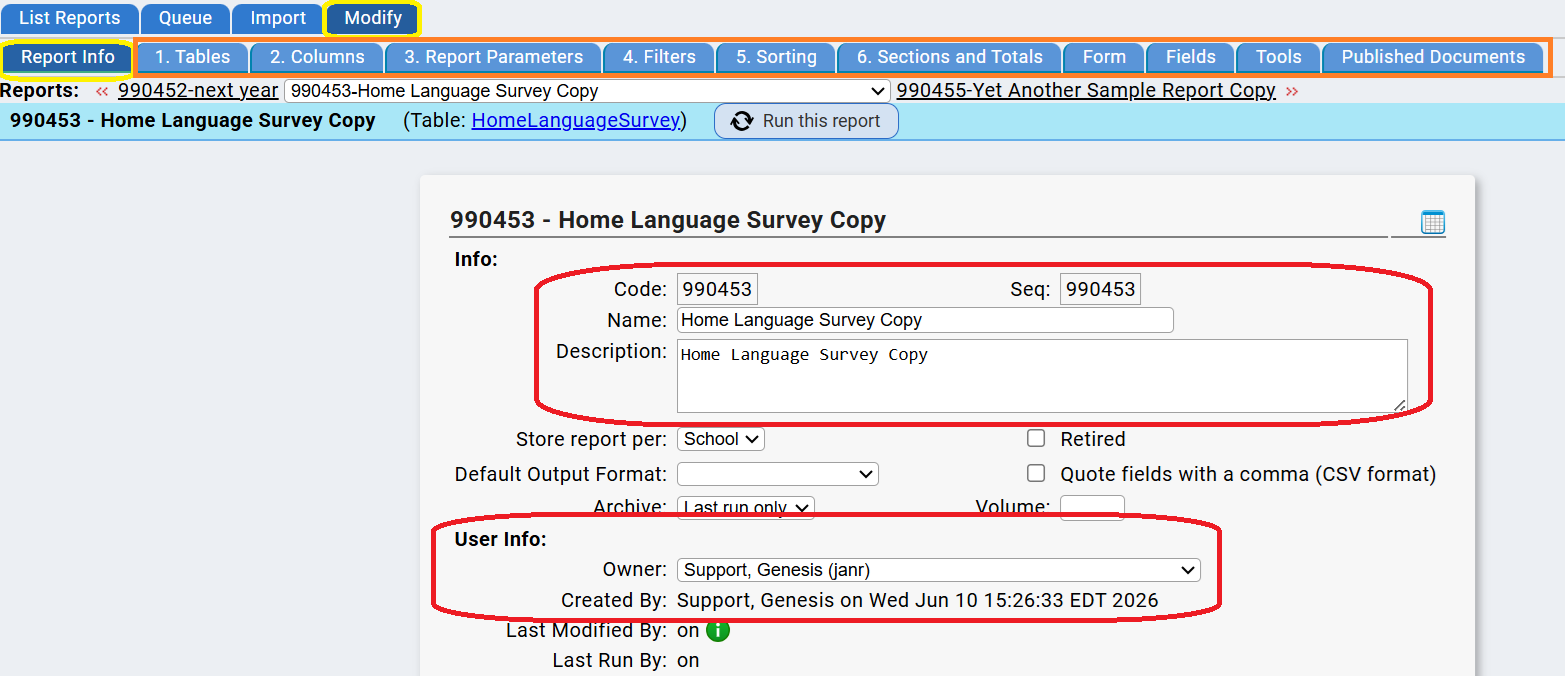
- Note that you will be the "owner" of the copy. The copy 'belongs' to you and you can do with it what you will. At that point the copy is no longer a 'built-in' - it is an ordinary ReportWriter report.
If these reports can be copied to the ReportWriter, can't other built-ins also be copied?
No - other built-ins cannot be translated to ReportWriter. These few reports already are ReportWriter reports, just ones supplied by Genesis. As ReportWriter reports they are already subject to the same protections and restrictions as all other ReportWriter reports.
The Custom Report Library Might Help
You can find the Custom Report Library here.
The Custom Report Library contains ReportWriter reports available to you in the following categories:
- Assessments
- Athletics
- Attendance & Class Attendance
- Conduct / Discipline
- Contact Information
- Elementary Grading Module
- Emergency Verification Forms
- Forms & Letters
- Gradebook
- Grading Module
- Integrations / Interfaces
- Lesson Planner & Standards
- Medical Information
- Parent Access Portal
- Payments / Fees & Fines
- Report Writer Related
- Scheduling Related
- Special Ed Data
- Staff Data
- State / Federal Reporting
- Student Data
- System & Security
- Turnstile
Was this article helpful?
That’s Great!
Thank you for your feedback
Sorry! We couldn't be helpful
Thank you for your feedback
Feedback sent
We appreciate your effort and will try to fix the article