Health release forms for individual sports are located in the bottom section of students' Athletics screen:

To locate this information do the following:
Step 1: Locate a student, open their record and click on their Athletics tab.
Step 2: Scroll down to the "Sports Participation" part of the screen. Each of the student's sports is listed, along with Health History Form information for that sport.
The system can be setup to allow Health History Update Forms to be:
- Uploaded into the system:
- Uploaded from the Parent Module's Athletics screen
- Entered by Parents via a "Parent Form" and then turned into a Student Document via a ReportWriter report.
- Manually uploaded via the Student's Documents screen by a staff member
- Displayed adjacent to the Health History Update Form status questions on the student's participation record:
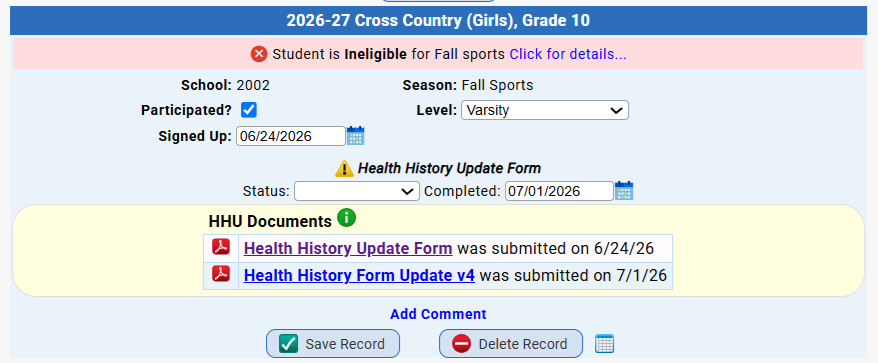
Health History Update Forms Handling in Genesis
Was this article helpful?
That’s Great!
Thank you for your feedback
Sorry! We couldn't be helpful
Thank you for your feedback
Feedback sent
We appreciate your effort and will try to fix the article