Staff Maintenance can update several pieces of data on the Staff object every night.
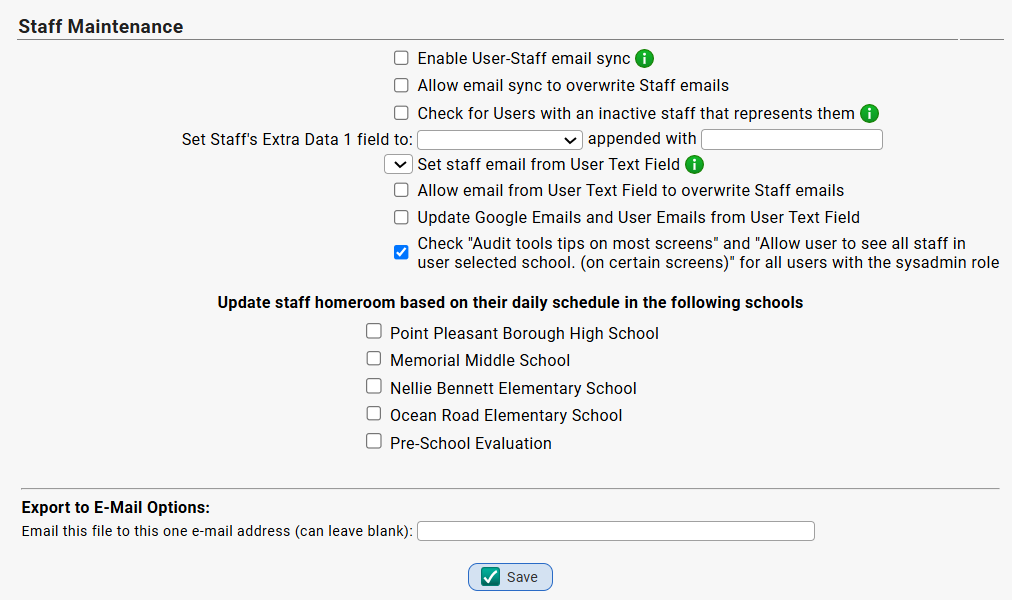
| Parameter | Notes |
| Enable User-Staff email sync | Sync the email field from a User account to the email field on a staff member that the User account is set to Represent |
| Allow email sync to overwrite Staff emails | |
| Check for Users with an inactive staff that represents them | Accounts found with an inactive staff that represents them will be logged as an error |
| Set Staff's Extra Data 1 field to / Appended With | |
| Set staff email from User Text Field | Set staff email to the value in the selected User Text Field. This will only change staff with no email. Use the override option to change all staff emails. |
| Allow email from User Text Field to overwrite Staff emails | |
| Update Google Emails and User Emails from User Text Field | |
Check "Audit tools tips on most screens" and "Allow user to see all staff in user selected school. (on certain screens)" for all users with the sysadmin role | |
| Update staff homeroom based on their daily schedule in the following schools | You can check off schools where you want this task to update a staff member's HR assignment each new day if their HR assignment switches from A day to B day, for example. |
Was this article helpful?
That’s Great!
Thank you for your feedback
Sorry! We couldn't be helpful
Thank you for your feedback
Feedback sent
We appreciate your effort and will try to fix the article